
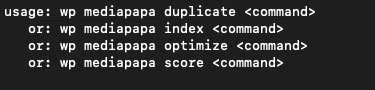
The following WP-CLI commands are available into Mediapapa :
- wp mediapapa duplicate
- wp mediapapa index
- wp mediapapa score
- wp mediapapa optimize
Each of theses commands have parameters allowing to control how they process data.
You can launch wp mediapapa to get the list of Mediapapa commands available.
Duplicate
This command allows to generate all the duplicate hashes for the hashes table.
Parameters
–per_transactions (int) : Allow to limit the number of attachments to process on each batch. By default we process 100 attachments.
Usage
wp mediapapa duplicate processTo limit the batches
wp mediapapa duplicate process --per_transaction=10Result
Indexing attachments page 1  100% [==============================================================================================================================================================================================] 0:00 / 0:00
Error: Indexing process done : 23 processed, 23 success, 20 errors
Index
This command allows to index all the attachment usages.
This command will parse :
- Users
- Posts
- Terms
- Options
And detect usages.
Two sub commands :
- process : Process the indexation
- delete : Delete the indexed values
Parameters
–type (string) : Allow to limit the objects to detect from. Possible values : posts, terms, options, users.
Not specifying this value will parse all the objects mentionned.
–taxonomy (string) : Allow to limit the taxonomies to check on.
Not specifying this value will parse all the taxonomies.
This is only applicable when passing type to terms.
–post_type (string) : Allow to limit the post type to check on.
Not specifying this value will parse all the post types.
This is only applicable when passing type to posts.
–per_transactions (int) : Allow to limit the number of objects to process on each batch. By default we process 100 objects.
Usage
wp mediapapa index processTo limit the batches
wp mediapapa index process --per_transaction=10Only make one taxonomy
wp mediapapa index process --taxonomy=categoryOnly process the terms
wp mediapapa index process --type=termsDelete the index for the posts :
wp mediapapa index delete --type=postResult
Indexing posts
Indexing posts : 29  100% [======================================================================================================================================================================================================] 0:00 / 0:00
Indexing terms
Indexing terms : 2  100% [=======================================================================================================================================================================================================] 0:00 / 0:00
Indexing users
Indexing users : 1  100% [=======================================================================================================================================================================================================] 0:00 / 0:00
Indexing options
Indexing options : 164  100% [===================================================================================================================================================================================================] 0:00 / 0:00
+---------+-------+
| type    | count |
+---------+-------+
| posts   | 29    |
| terms   | 2     |
| users   | 1     |
| options | 164   |
+---------+-------+
Score
This command allows to recalculate the score for the attachments.
Parameters
–per_transactions (int) : Allow to limit the number of attachments to process on each batch. By default we process 100 attachments.
Usage
wp mediapapa score processTo limit the batches
wp mediapapa score process --per_transaction=10Result
Truncate the score table to start fresh.
Calculating score for attachments page 1  100% [=================================================================================================================================================================================] 0:00 / 0:00
Success: Score indexing process done : 23 processed, 23 success, 0 errors
Optimize
This command allows to optimize a media.
If the attachment have already been processed, it’s skipped.
Arguments
You can push specific attachment ids if you want.
Parameters
–per_transactions (int) : Allow to limit the number of attachments to process on each batch. By default we process 100 attachments.
Usage
wp mediapapa media processTo limit the batches
wp mediapapa media process --per_transaction=10Process only the 10, 12 and 15
wp mediapapa media process 10 12 25Result
Optimizing for attachments 23  100% [============================================================================================================================================================================================] 0:02 / 0:03
+-------+--------------------------------------------------------+
| image | message                                                |
+-------+--------------------------------------------------------+
| 38    | Image optimized.                                       |
| 37    | Image optimized.                                       |
| 36    | Image optimized.                                       |
| 35    | Image optimized.                                       |
| 34    | Image already optimized.                               |
| 33    | Image already optimized.                               |
| 31    | Image already optimized.                               |
| 30    | Image already optimized.                               |
| 24    | Image already optimized.                               |
| 23    | Image optimized.                                       |
| 22    | Image optimized.                                       |
| 21    | Image optimized.                                       |
| 20    | Image optimized.                                       |
| 19    | Image optimized.                                       |
| 18    | Image optimized.                                       |
| 17    | Image optimized.                                       |
| 16    | Image already optimized.                               |
| 15    | Image already optimized.                               |
| 14    | Image already optimized.                               |
| 13    | Image already optimized.                               |
| 12    | Image already optimized.                               |
| 11    | Image optimized.                                       |
| 10    | Image optimized.                                       |
+-------+--------------------------------------------------------+
How to bootstrap Mediapapa totally
You can bootstrap Mediapapa as the indexer from backend will do like this :
# Index the elements
wp mediapapa index process
wp mediapapa duplicates process
wp mediapapa score process
🛟 Need Help?
Any other questions or requests about WP-CLI commands?
Email us at :
We’re always here to help.