
✔ Prerequisites
Before you install Mediapapa, make sure your site environment is compatible:
- PHP: Version 8.0 or higher (latest version strongly recommended for optimal performance and security).
- WordPress: Version 6.3 or higher (update to the latest WordPress version to benefit from full compatibility and features).
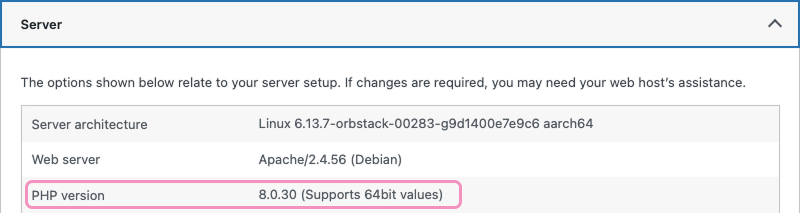
To verify your versions:
- Go to your WordPress Admin → Tools → Site Health.
- Open the Info tab.
- In the first panel “WordPress”, check your WordPress version.
- In the “Server” panel, find your PHP version.

⚙ Installation with ZIP file
To begin with you have to purchase a Mediapapa plan, and you will receive access to the latest version of Mediapapa. Afterward follow these steps to download it:
- Download the ZIP file from the link sent to your email ✉ after a purchase or from your Mediapapa account dashboard → My downloads.
- In WordPress Admin, go to Plugins → Add New, then click Upload Plugin.
- Upload the ZIP file by drag & drop or by selecting it from your computer.
- Click Install Now, and wait for the plugin installation to finish
- Lastly click Activate Plugin ✅🥳
Keep in mind that you have to add your Mediapapa API licence to the plugin in order to benefit from all features, but also incoming updates and support from our team.Next step: Activate your Mediapapa License Key