

Today we are releasing version 1.5.0 of both Mediapapa Pro and Free.
A word from the team
It’s Tuesday again and here come the updates!
In the last release cycle, we heard your feedback, so we are changing the way our releases work. We are keeping a single release note for Free and Pro AND the version numbers will now be aligned to simplify tracking. We bumped both Free and Pro to version 1.5.0.
Now, during this sprint we were focused on reducing risks during cleanup and optimization actions, while keeping the day-to-day workflow simple for site owners.
I’m super excited to share something very cool: Mediapapa is now safer with a trash system for cleaning actions, and backup/restore support for optimized images. We also made internationalization better, and several quality-of-life improvements for our products.
Now go update it and tell us what you think. 🤙
Common to both versions
Media Trash activation and explanation
This release introduces a new trash flow for cleaning operations: a media can be moved to trash instead of being instantly deleted, then listed and restored when needed. As easy as that.
When a media item is moved to trash, Mediapapa now renames it with a -trash suffix. This improves handling of stale URLs and helps reduce confusion while content and caches are updating.
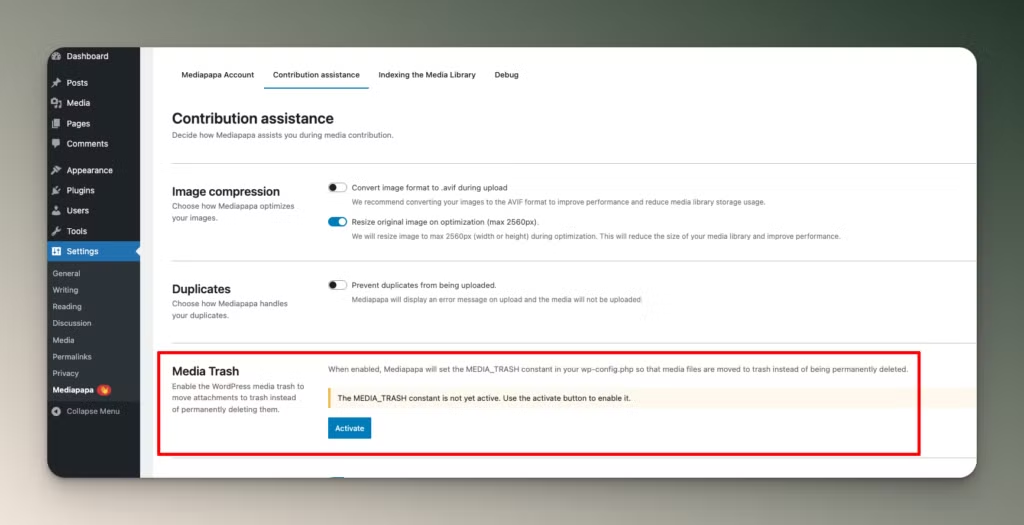
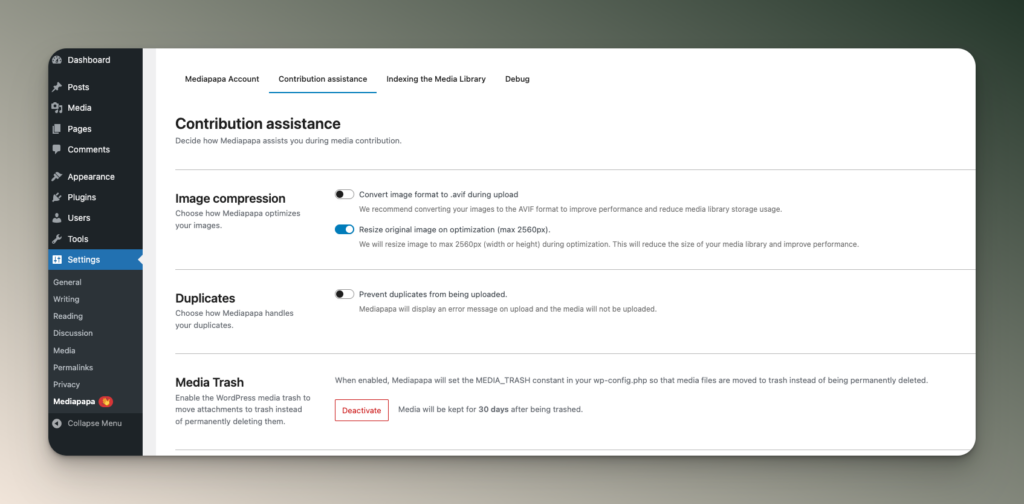
If you want to activate this, head to Mediapapa settings, then click on the contribution assistant tab. You’ll find a new Media Trash section.
This feature is built on top of native WordPress constants: MEDIA_TRASH and EMPTY_TRASH_DAYS. Mediapapa detects whether media trash is currently active, reports the status, and can propose enabling the related configuration from the plugin UI.
This gives you a safer deletion flow out of the box and helps avoid accidental permanent removals when cleaning your Media Library. Final responsibility still belongs to the site administrator, who should validate whether WordPress trash is active and confirm the right retention policy for their setup.
i18n and quality-of-life updates
- Improved and clarified translated strings across the interface.
- Additional UX polish on media trash and restoration flows.
- Multiple labels and messages were rewritten to make actions and consequences clearer before confirming destructive operations.
Specific to Pro 1.5.0
Optimization backup and rollback
Before 1.5.0, image optimization could feel risky because going back to the exact original file was not always straightforward. With this release, Mediapapa now creates a dedicated -backup version before optimization.
If needed, you can rollback and restore the original file and related metadata. This gives you a safer and reversible workflow: optimize first, validate quality and compatibility, then keep or revert without manual recovery work.
Other changes
- Multisite: license behavior is now fixed. When a network-level license is defined, local site activation is correctly blocked to avoid conflicting states.
- The indexing process is now synchronised between the plugin UI and the WP-CLI commands.
What’s next
In the next sprints we are actively exploring WooCommerce to prepare a proper integration. We are also finishing a few remaining improvements around media trash and restoration, adding more quality-of-life refinements, expanding French translations, and working on a new feature for users to exclude specific media from suggested actions.
If you have something you want to see, vote on the public roadmap.

